How to Automate Job Scheduling in Your Contracting Business: The Blueprint for a Well-Oiled Machine

For too many contractors: the Paving, HVAC, Plumbing, Electrical, and Roofing pros out there find that job scheduling isn’t at the heartbeat of the business; it’s the source of constant, crippling chaos. We see it every day: the whiteboard smeared with last-minute changes, the dispatch manager drowning in spreadsheets, and the crew chiefs endlessly arguing about drive time.
This isn't just an inconvenience; it’s a massive, self-inflicted bottleneck that crushes profitability, burns out your best people, and makes your business completely unscalable.
You didn't get into contracting to manage a fleet of paper calendars. You got in to deliver high-quality work.
The good news?
The solution isn't another management seminar; it’s installing a scalable system that runs itself. By combining smart technology with absolute clarity on SOPs and accountability, you stop the daily chaos and build the well-oiled machine you always wanted. This isn't a theory.
We’ve fixed this problem for hundreds of trade and service businesses right here in Columbus, and we’re going to walk you through the practical, actionable structure in four key areas: Workflow, Software, Operations, and Marketing.
Workflow Consulting: Eradicating Friction and Defining the Process
Before you buy a single piece of new software, you have to fix your existing workflow. Automation doesn’t fix a broken process; it just speeds up the brokenness. The core of Workflow Consulting is creating Standard Operating Procedures (SOPs) for how a job moves from a prospect to a completed invoice.
The Problem: The High-Friction Handoff
In a typical contractor’s business, the handoff between Sales/Estimating and Operations is the biggest scheduling bottleneck.
Look closely at steps 3 and 4. That is the point of maximum friction. Your sales team marks a job as "Closed Won," and a human has to manually re-enter all the job details, crew requirements, and customer info into a separate calendar. This introduces delays, transcription errors, and scheduling conflicts. An effective scheduling system eliminates this manual handoff entirely.
Designing the Job Scheduling SOP
A scalable system requires clear rules. Your scheduling SOPs must dictate not only when a job is done, but how it gets prioritized and who is qualified to do it.
1. Implement Capacity-Based Scheduling
Stop scheduling jobs and start scheduling capacity. Your schedulers should only be able to book based on available, pre-allocated resources. This means defining your capacity by:
Crew Hours: Total available labor hours per week.
Skill Sets: Tagging crews or individual technicians with specific certifications (e.g., “Master Plumber,” “HVAC Certified,” “High-Voltage Electrical”).
Equipment: Availability of specialized, non-standard equipment (e.g., specific paving machines, large cranes, specific aerial lifts).
When a new job enters the system, the scheduling tool only presents slots where the required skill and equipment match the available capacity. If the job requires a Master Electrician and all three are booked, the system prevents double-booking without requiring human intervention. This is the definition of a workflow with zero-defect gates.
2. The Priority Matrix SOP
Not all revenue is created equal. Your business needs an SOP to prioritize jobs automatically. Define your simple matrix:
Emergency Service (Highest Priority): Bypasses standard scheduling, triggers an immediate "Urgent Dispatch" alert to the closest available, qualified crew.
New Install/Project (High Priority): Scheduled based on material readiness and customer availability, but with fixed, non-negotiable capacity slots.
Maintenance/Warranty (Medium Priority): Booked out 1-3 weeks in advance to fill capacity gaps, ensuring consistent utilization during slower periods.
Estimate Follow-Up (Low Priority): Automated reminders for sales to follow up, avoiding cluttering the operational calendar.
This formalizes decision-making, taking the daily emotional roller coaster out of the dispatcher's seat and embedding it into the system.
Software Consulting: The Tech That Works for You
Your technology stack isn't just a collection of apps; it’s the digital infrastructure of your well-oiled machine. For contractors, the goal is a seamless, integrated environment where data flows automatically from lead to invoice.
Ditch the Calendar App; Use Field Service Management (FSM)
The single biggest upgrade you can make is moving from generic calendar apps (like Google Calendar or Outlook) to specialized Field Service Management (FSM) software. These platforms are built specifically for the contracting workflow.
Key Software Recommendations for Contractors:
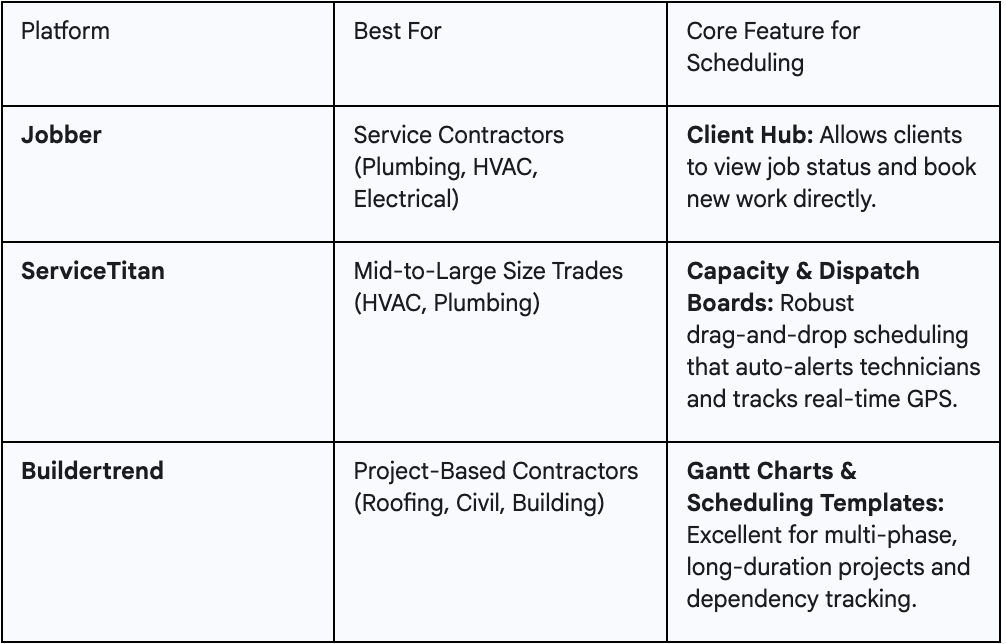
A single, powerful FSM tool is a great start, but true automation comes from connecting it to your other critical systems. This is where you eliminate manual data entry before it becomes a massive bottleneck for administrative staff.
1. CRM to Scheduler Integration (Marketing Workflow)
When your sales team uses a CRM like Pipedrive or the built-in CRM features of Jobber, the moment a deal is marked "Closed Won," the scheduling system must be notified.
The System Flow: A successful proposal is accepted in the CRM. An automation rule (often powered by a tool like Zapier or a native integration) triggers the creation of a pre-scheduled job card in the FSM software, complete with the customer's name, address, job description, and estimated duration.
The Result: The scheduler moves from being a data-entry clerk to an operational strategist. They no longer input information; they simply optimize the automatically created job on the crew board. This step is vital for scalability.
2. Scheduler to Accounting Integration (Workflow Operational)
The final step in the field workflow is also critical for your financial SOPs. Once a technician marks a job as "Complete" in the FSM app and collects payment or a signature, the system must trigger the final accounting sequence.
The System Flow: Job marked "Complete" and "Invoiced" in Jobber Automation triggers a corresponding invoice creation in QuickBooks (or similar accounting software).
The Result: You cut days out of your cash conversion cycle. You eliminate the admin step of manually matching work orders to invoices. This is a crucial operational improvement that directly impacts your cash flow and reduces administrative waste.
3. Operational Consulting: Installing Accountability and Metrics
Scheduling automation is a massive change management event. To make it stick, you need to install an operating system based on accountability and real-time data. This is how you transition from doing the work to running the business.
Defining Scheduling Accountability: The Dispatcher Role
In many growing contracting firms, the scheduling function is handled by an overworked owner, an admin assistant, or a team manager pulling double duty. For a scalable system to work, you need clear accountability.
The Dispatcher's primary responsibility is not to schedule the work.
Their primary responsibility is to maximize Crew Utilization and ensure Schedule Adherence.
They must treat the schedule not as a suggestion, but as a rigid SOP; a living document that governs the next 24-48 hours of your business.
Measuring and Optimizing with KPIs
You can't manage what you don't measure. When you automate your scheduling, your software should be churning out the data you need to identify hidden bottlenecks and drive continuous improvement.
1. Crew Utilization Rate (The Efficiency Metric)
This is the single most important metric for profitability. It measures how effectively you are utilizing your paid labor hours.
Actionable System: A rate below 75% indicates you have too much crew for your current sales volume or your scheduling process is leaky (not filling gaps). A rate consistently above 95% indicates you are overstretched and probably sacrificing quality or customer experience. Use your FSM dashboard to keep this KPI front-and-center. Your Dispatcher is accountable for hitting the target utilization rate (e.g., 85%).
2. Schedule Adherence (The Consistency Metric)
This measures the difference between your plan (scheduled start time) and reality (actual start time).
Actionable System: If your adherence rate is low, the problem is rarely the techs. It’s a process bottleneck in your planning. Are the dispatchers over-optimizing drive time? Are you missing a key SOP for vehicle loading? A sub-90% adherence rate means you have an operational leak that is directly causing customer friction and costing you money. High adherence rates are a sign of a true well-oiled machine.
3. Run Your Daily Huddle with the Schedule
Embrace EOS principles by making the schedule the focal point of your daily stand-up meeting (or "L10 Huddle"). Every morning, the Operations Manager should review the prior day’s schedule status in 15 minutes:
Review: What jobs went "Red" (ran over or were late)?
Root Cause: Why? Was it a crew skill issue? A materials delay (bottleneck)? Or a planning failure?
Fix the Process: Document the fix (the SOP refinement) so it doesn’t happen again. This creates a culture of accountability and embeds process improvement into your daily rhythm.
Marketing Consulting: Controlled Growth Through Client Experience
You might think scheduling is purely operational, but it is one of the most powerful tools in your marketing arsenal. Flawless scheduling transforms client experience, which is essential for attracting the right high-value jobs and sustaining controlled, predictable growth.
Automating Client Communication: Your Professional SOP
Your customer doesn't care about your internal bottlenecks. They care about your consistency and communication. The primary friction point for a client is the anxiety of not knowing if or when the crew will show up. Automated communication solves this, turning a potential complaint into a moment of professionalism.
The Pre-Job Confirmation SOP
This communication is a mandatory, automated part of your workflow.
24-Hour Reminder: An automated text/email confirming the date and time window.
"Tech is En Route" Notification: The single most valuable notification. Triggered by the technician hitting "Depart" on their mobile app, complete with a GPS tracking link and a picture of the tech.
The Result: You eliminate "no-shows," save your administrative team dozens of hours answering "Where are they?" calls, and establish your brand as highly professional and reliable. This is an SOP that builds customer trust.
Turning Completed Work into Future Leads
A job marked "Complete" should immediately trigger the Marketing Workflow.
Post-Job Survey/Review Request: An automated email or text message 24-48 hours after the job, asking the client to leave a review or complete a quick satisfaction survey.
Maintenance Follow-Up: Based on the job type (e.g., a new HVAC installation), the system should automatically schedule a reminder for a follow-up maintenance offer six months or one year later.
This closes the loop: The efficient, automated workflow leads to a great client experience, which generates positive reviews (Marketing), which attracts more high-value jobs, fueling your entire scalable system.
Trading Chaos for Consistency
We’ve seen it time and time again: contractors whose businesses are stuck at the $1 million to $5 million mark, not because they lack skill or demand, but because their internal systems are collapsing under the weight of manual processes.
Your manual scheduling process is the single biggest drain on your time, your profits, and your sanity. By adopting this four-pillared approach you are not just scheduling jobs. You are building a predictable, well-oiled machine capable of controlled, sustainable growth.
Designing a zero-friction workflow,
Implementing integrated software,
Installing operational metrics for accountability,
And leveraging automation for superior client experience (Marketing)
Stop letting the daily chaos control you. It’s time to install the scalable systems that make your business run with total consistency.
Want help mapping your current bottlenecks and installing the right SOPs and integrated tech stack?